
The Reassurance Solutions monitoring platform
One dashboard for a clearer view of your facility.
ReassureHub brings information from supported Reassurance Solutions monitoring technologies into a centralized dashboard, helping authorized staff review measurements, notifications, and system records.
Meet ReassureHub
Monitoring information, organized for your team
ReassureHub is a web-based dashboard for supported Reassurance Solutions monitoring technologies. It brings information from the XK300 contactless sensor and ReassureBand wearable into a centralized view for authorized users.
Staff can review monitored measurements, configured notifications, and system records through the platform. Facility personnel define how they use that information within local procedures and clinical workflows.
See ReassureHub in action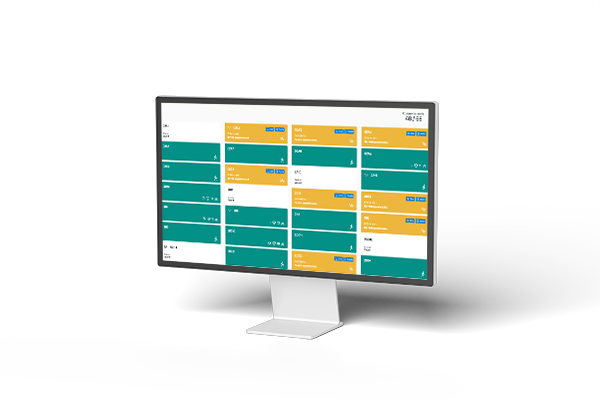
Platform capabilities
Tools for reviewing monitoring activity
ReassureHub organizes data from connected monitoring technologies and supports facility-defined notification and documentation workflows.
Centralized monitoring view
Review supported monitoring information in one dashboard instead of switching between separate product interfaces.
Cell and block views
Review information by individual cell or roll up views to a housing block, based on your facility’s configuration.
Configurable notifications
Configure notifications for designated staff when monitored data changes from facility-defined thresholds or baselines.
Timestamped records
Review monitoring events and staff response records with timestamps to support facility documentation and internal review.
Notification routing
Depending on system configuration, notifications can be routed to designated control room staff, medical personnel, or mobile devices.
Integration planning
ReassureHub is designed with integration options for jail management systems. Contact our team to discuss your facility’s requirements.
Explore the dashboard
Click a hotspot to learn what you’re seeing
ReassureHub organizes cell status, alert details, and vital sign information in views designed for facility staff.
Facility status overview
See cell tiles and status indicators across a facility or selected floor.
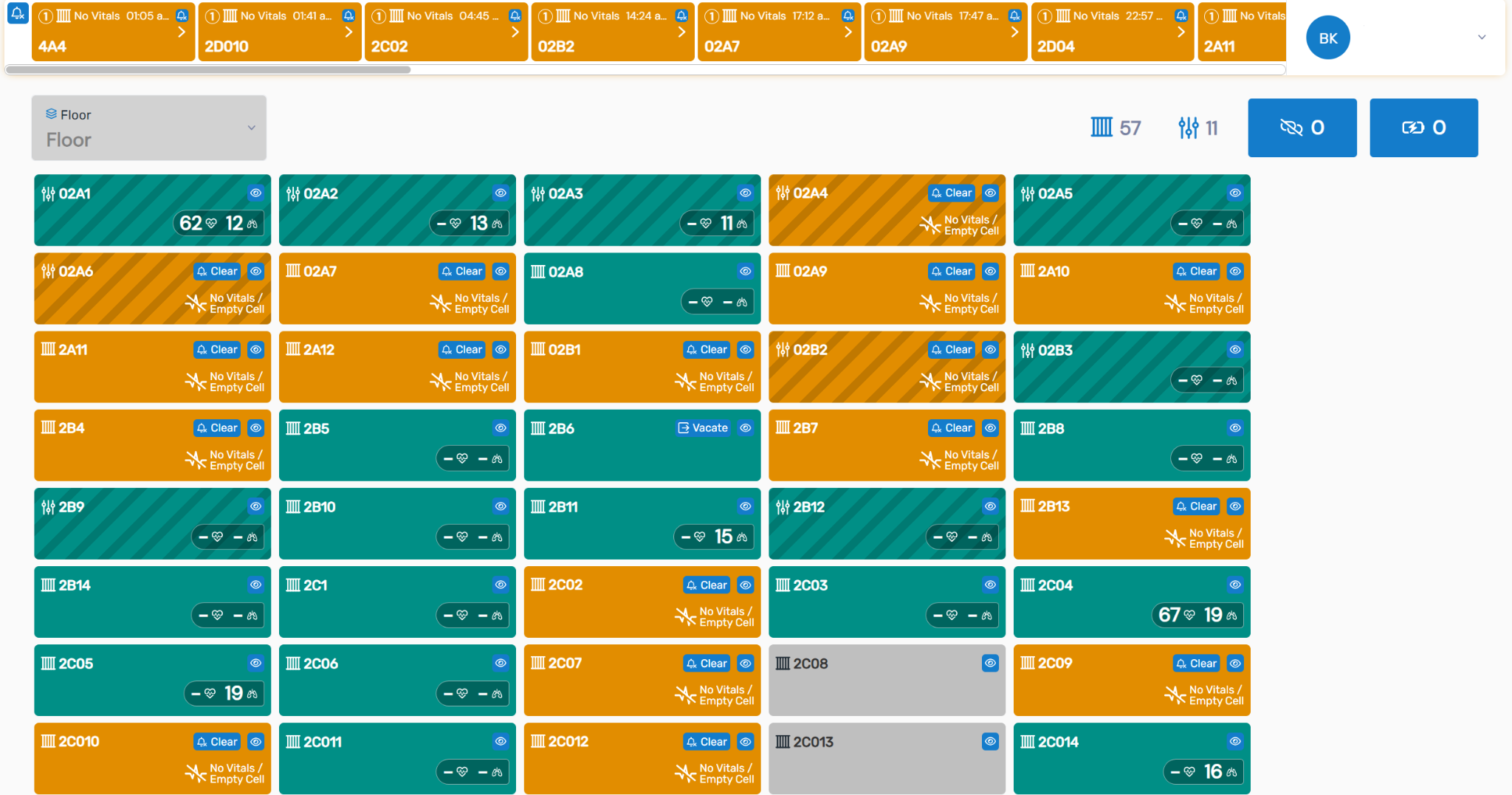
Facility notification strip
The top strip surfaces cells with active notifications. Selecting a notification opens more detail for staff review.
Floor selector
Choose the facility area or floor shown in the dashboard, according to the facility’s setup.
Cell status tiles
Each tile represents a cell with a connected sensor. Labels, icons, and colors communicate the displayed cell status. Select a tile to open its detailed cell view.
Dashboard counts
These summary indicators provide a quick count of the items represented in the current dashboard view.
Select a plus sign to open a feature explanation.
Detailed cell view
Review a selected cell’s current status, recent notifications, and displayed vital sign measurements.
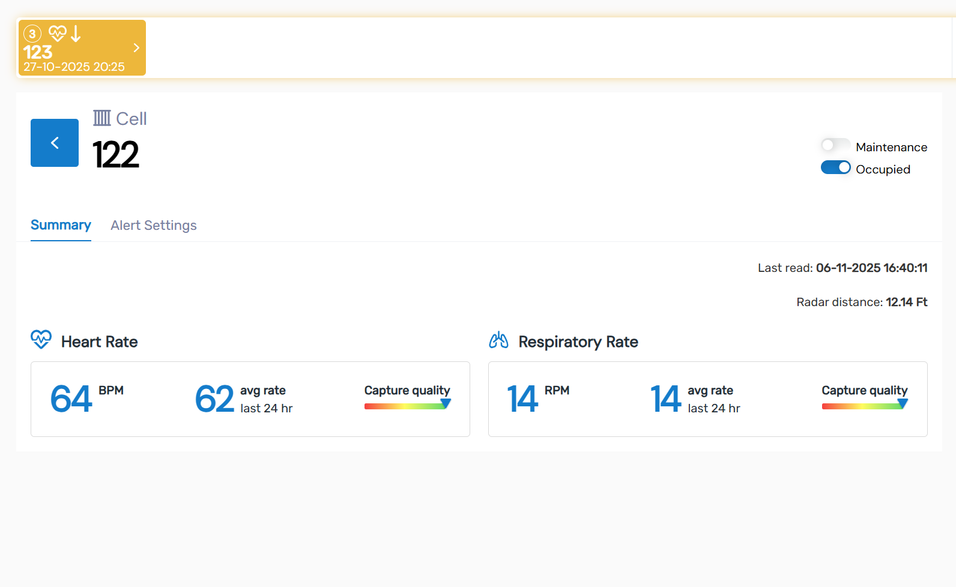
Cell alert feed
The feed shows notifications associated with the cell, including the type and time, so staff can select an item for review.
Cell number
The header identifies the facility, floor, and cell associated with the information on screen.
Occupancy and maintenance controls
These controls display or update the cell’s occupancy and maintenance status according to facility workflow.
Heart rate reading
The panel displays the heart rate measurement when a reading is being captured. Values shown in this example are from the manual.
Capture quality indicator
This indicator shows the quality of the captured signal. The manual identifies green as an indication that a reading is being obtained.
Respiratory rate reading
The panel displays the respiratory rate measurement when a reading is being captured. Facility clinical workflows guide review and response.
Select a plus sign to open a feature explanation.
Alert details
Review the notification type, timestamp, associated measurement, and cell before following facility procedures.
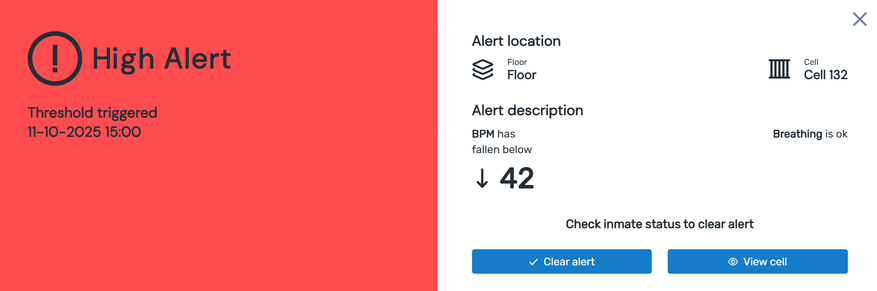
Alert type
The colored badge identifies the configured alert category shown in this example. Facility protocols determine the appropriate review and response.
Timestamp
The timestamp shows when the displayed threshold condition was recorded by the system.
Measurement that triggered the alert
This area shows the measurement associated with the notification. The example displays a heart rate value; it is not a diagnosis.
Cell location
The location identifies the floor and cell associated with the displayed notification.
Clear notification and view cell actions
The screen provides options to clear the notification or open the detailed cell view. Staff follow facility procedures when using these controls.
Select a plus sign to open a feature explanation.
How it works
From monitored data to staff review
ReassureHub provides a shared place to view supported monitoring data and configured notifications. Facility staff determine the response under local procedures.
Monitoring technology collects data
Connected products, including the XK300 and ReassureBand, collect their supported measurements and status information.
ReassureHub organizes information
The dashboard presents supported information in configured facility, housing-area, and cell views.
Staff review and follow procedures
When configured measurements change from a facility-defined threshold or baseline, designated staff can receive a notification and follow their established response protocols.
Connected technologies
One platform. Multiple monitoring options.
ReassureHub brings supported Reassurance Solutions technologies together for a centralized monitoring view.
XK300 contactless sensor
The XK300 measures heart rate and respiration rate in adult patients without physical contact. It can provide supported sensor measurements to ReassureHub for facility staff review. The XK300 is also sold as ReassureSense.
Learn about XK300 →ReassureBand wearable
ReassureBand is a wearable monitoring option that provides supported physiological indicators, location information, and device status data through ReassureHub.
Learn about ReassureBand →Frequently asked questions
ReassureHub FAQs
What is ReassureHub?
ReassureHub is a web-based dashboard that brings supported information from Reassurance Solutions monitoring technologies into a centralized interface for authorized facility users.
What products connect with ReassureHub?
ReassureHub supports information from Reassurance Solutions monitoring products configured for a facility, including the XK300 contactless sensor and ReassureBand wearable.
What does ReassureHub do when a measurement changes?
When monitored data changes from a configured threshold or baseline, ReassureHub can provide a notification to designated staff. Facility personnel determine how to review the information and respond under their procedures.
Does ReassureHub make clinical decisions?
No. ReassureHub displays supported monitoring information and notifications. It does not diagnose or determine treatment. Qualified healthcare professionals and facility personnel make care decisions under applicable clinical protocols.
Can ReassureHub keep records of monitoring events?
ReassureHub provides system records for supported monitoring events and responses. Facilities can discuss available reporting and documentation options during implementation planning.
Can ReassureHub integrate with our jail management system?
ReassureHub is designed with integration options. Contact Reassurance Solutions to discuss compatibility with your existing systems and facility requirements.
How can our facility see ReassureHub?
Contact Reassurance Solutions to schedule a demonstration and discuss your facility’s monitoring needs, connected products, and dashboard configuration.
Reassurance Solutions
See how ReassureHub can support your monitoring workflow
Talk with our team about connected monitoring products, dashboard views, and facility-configured notifications.
Request a ReassureHub demoReassureHub is a monitoring and information platform. It does not diagnose, treat, or make care decisions. The XK300’s FDA 510(k) clearance applies to measurement of heart rate and respiration rate in adult patients; correctional facility use was not specifically reviewed or cleared by FDA. Facility staff and qualified healthcare professionals determine how monitoring information is reviewed and used.